Implementing new accounting software is a significant step for any business. While Xero is known for its user-friendly interface and powerful cloud accounting features, a successful Xero implementation involves much more than simply creating an account and importing your data.
A well-planned implementation ensures your financial records remain accurate, your team adapts quickly, and your business continues operating with minimal disruption. Without proper planning, businesses may encounter issues such as incorrect opening balances, duplicate records, reporting errors, or workflow inefficiencies that take time to resolve.
Whether you’re moving from Sage, QuickBooks, NetSuite, Zoho Books, spreadsheets, or another accounting system, taking a structured approach will help you get the most from your investment.
In this guide, we’ll walk you through every stage of a successful Xero implementation, from planning and preparation to testing, training, and ongoing support.
What Is Xero Implementation?
Xero implementation is the complete process of setting up Xero so it works effectively for your business. It includes much more than migrating financial data from one system to another.
A successful implementation involves reviewing your current accounting processes, preparing and cleaning financial data, configuring Xero, importing records, connecting business applications, testing workflows, training users, and monitoring the system after it goes live.
The objective is to create a reliable accounting environment that supports accurate reporting, efficient day-to-day operations, and long-term business growth.
Every business has different requirements, so no two implementations are exactly the same. A small business with simple bookkeeping needs will have a different implementation process from a growing company managing inventory, payroll, multiple departments, or international transactions.
Why a Well-Planned Xero Implementation Matters
Many implementation problems occur because businesses rush the process or underestimate the amount of preparation required.
Planning your implementation carefully offers several benefits, including:
- Better financial accuracy
- Faster month-end reporting
- Reduced manual data entry
- Improved cash flow visibility
- Easier collaboration with accountants
- Stronger financial controls
- Greater confidence in reporting
- Minimal disruption to daily operations
Instead of simply replacing your accounting software, implementation gives you an opportunity to improve your accounting processes and remove inefficiencies that may have built up over time.
Signs Your Business Is Ready for Xero
If you’re unsure whether it’s the right time to move to Xero, consider whether any of these situations apply to your business.
- Your current accounting software feels outdated.
- Reporting takes too long.
- You still rely heavily on spreadsheets.
- Manual data entry consumes valuable time.
- Bank reconciliation has become difficult.
- Your business is growing rapidly.
- Remote working has become more common.
- You need better financial visibility.
- Your accountant recommends moving to cloud accounting.
- Your existing software no longer supports your business needs.
Recognising these signs early allows you to plan your implementation before accounting issues begin affecting business performance.
Benefits of Implementing Xero
Businesses choose Xero because it helps simplify financial management while providing access to real-time information.
Some of the biggest benefits include:
Cloud-Based Access
Access your accounts securely from anywhere with an internet connection.
Real-Time Financial Reporting
View up-to-date financial reports without waiting until month-end.
Automated Bank Feeds
Reduce manual bookkeeping by importing transactions directly from your bank.
Improved Collaboration
Multiple users can work in Xero at the same time with role-based permissions.
Faster Invoicing
Create professional invoices quickly and track payments more efficiently.
Integration with Business Apps
Connect Xero with hundreds of business applications including payroll, CRM, inventory management, payment platforms, and eCommerce solutions.
Set Clear Objectives Before You Begin
Every successful Xero implementation starts with a clear understanding of what you want to achieve.
Ask yourself:
- Why are we implementing Xero?
- Which accounting challenges are we trying to solve?
- What reports do we rely on?
- Which manual processes can be automated?
- Which departments will use Xero?
- Which systems need to integrate with Xero?
Defining your objectives helps shape the entire implementation project and keeps everyone focused on the same outcomes.
Build the Right Implementation Team
A successful implementation often involves several people across the business.
| Team Member | Responsibilities |
| Business Owner | Approves project decisions and objectives |
| Finance Manager | Reviews accounting requirements |
| Accountant | Validates financial accuracy |
| Bookkeeper | Reviews daily transaction processes |
| IT Support | Assists with integrations and access |
| Department Managers | Confirm operational workflows |
| Xero Implementation Partner | Plans, configures, migrates, tests, and supports the implementation |
Clear communication throughout the project helps avoid misunderstandings and delays.
Review Your Existing Accounting System
Before moving to Xero, take time to review your current accounting records.
Areas to examine include:
- Chart of Accounts
- Customer records
- Supplier records
- Bank accounts
- VAT settings
- Payroll information
- Fixed assets
- Inventory
- Outstanding invoices
- Historical transactions
Many businesses discover duplicate contacts, unused accounts, or incorrect VAT codes during this review.
Cleaning your data before implementation improves reporting accuracy after migration.
Decide What Data Should Be Migrated
Not every business needs to import years of accounting history.
Common migration options include:
Opening Balances Only
Suitable for businesses beginning a new financial year or those with straightforward reporting requirements.
Current Financial Year
Provides detailed reporting while keeping implementation relatively simple.
Full Historical Transactions
Recommended for businesses requiring historical reporting, audits, management analysis, or long-term financial comparisons.
Choosing the right migration scope helps balance reporting requirements with implementation time and cost.
Prepare Your Financial Data
Preparing your financial records is one of the most important parts of any Xero implementation.
Before migration, review:
- Trial Balance
- Profit and Loss
- Balance Sheet
- Customer balances
- Supplier balances
- Outstanding invoices
- Credit notes
- VAT returns
- Bank reconciliations
- Fixed asset registers
Your reports should balance before any data is imported into Xero.
Correcting problems beforehand is much easier than resolving them after implementation.
Create a Realistic Implementation Timeline
Having a structured timeline keeps the project organised and helps avoid unnecessary delays.
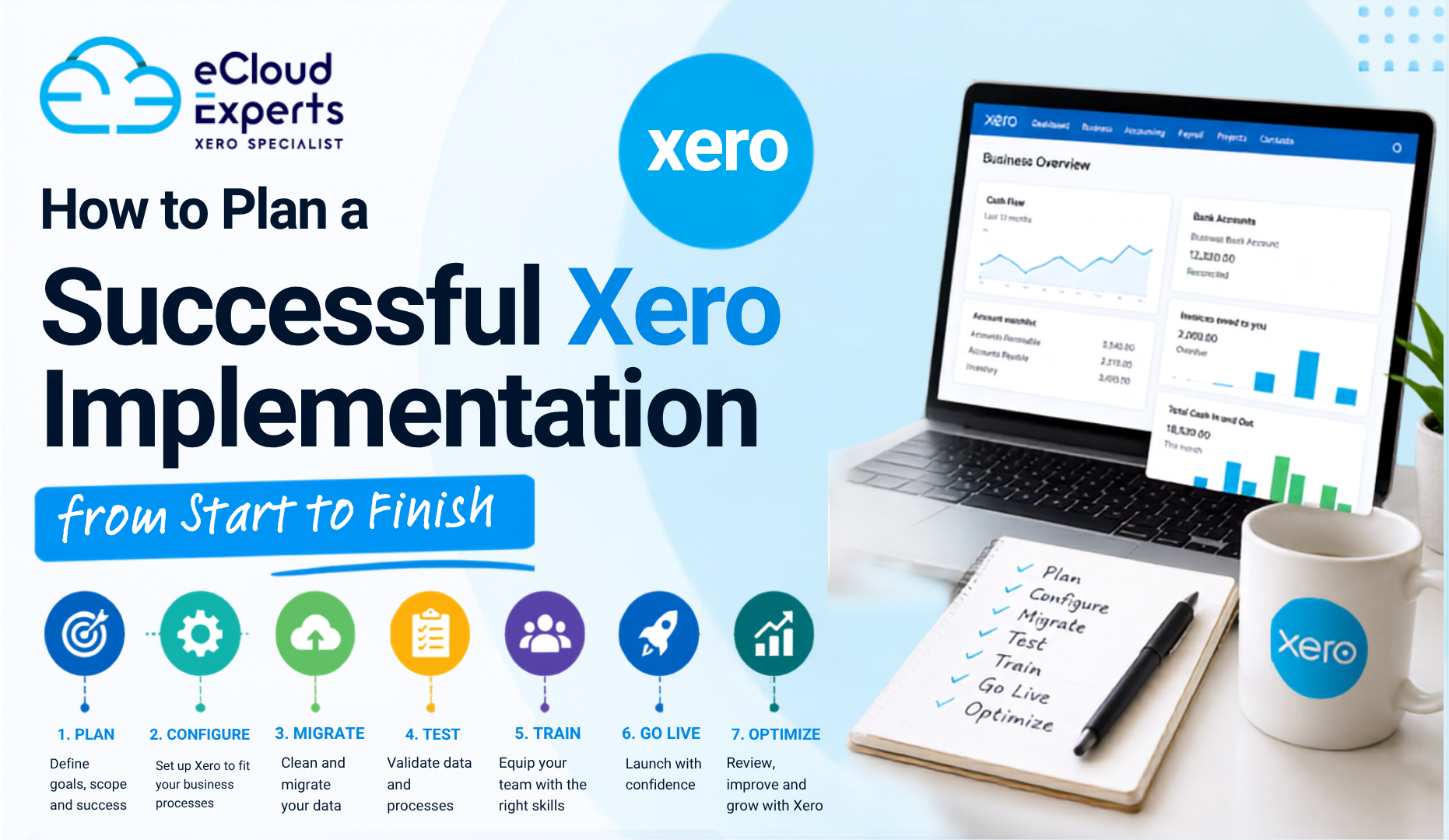
A typical implementation may look like this:
| Phase | Main Activities |
| Discovery | Review current system, define goals, gather requirements |
| Planning | Clean data, prepare reports, confirm migration scope |
| Configuration | Set up Xero settings, users, VAT, accounts, branding |
| Migration | Import financial data and validate records |
| Testing | Review reports, workflows, integrations, and permissions |
| Go Live | Begin using Xero for daily operations |
| Support | Monitor performance and provide additional training |
Larger organisations may require additional planning depending on complexity.
Configure Xero Correctly
Proper configuration helps ensure your accounting system supports your business processes from day one.
Important setup areas include:
- Organisation details
- Financial year
- Base currency
- VAT settings
- Chart of Accounts
- Tracking categories
- Invoice branding
- Payment terms
- User permissions
- Bank accounts
Taking time to configure these settings properly reduces the need for future adjustments.
Connect Your Business Applications
One of Xero’s greatest strengths is its ability to integrate with other software.
Popular integrations include:
- Shopify
- WooCommerce
- Stripe
- PayPal
- HubSpot
- Dext
- Hubdoc
- ApprovalMax
- A2X
- Link My Books
- Synder
These integrations reduce manual work and improve efficiency across your business.
Import Your Financial Data Carefully
Importing data should always be completed in stages.
Typical data includes:
- Contacts
- Chart of Accounts
- Products and services
- Sales invoices
- Purchase bills
- Bank transactions
- Inventory
- Fixed assets
- Opening balances
After each import, compare totals against your previous accounting system to ensure accuracy.
Protect Your Financial Data During Implementation
Financial information is one of your business’s most valuable assets.
During implementation, you should:
- Create backups of existing accounting data.
- Limit user access during migration.
- Share files securely.
- Verify imported balances.
- Enable multi-factor authentication.
- Review user permissions.
- Test access controls before going live.
Strong security practices help protect your financial information throughout the project.
Test Everything Before Going Live
Testing helps identify issues before your team starts using Xero every day.
Test areas include:
- Sales invoices
- Purchase bills
- Bank reconciliation
- VAT calculations
- Financial reports
- Approval workflows
- Payment processing
- User permissions
- Integrations
- Dashboard reporting
Fixing issues during testing is far easier than correcting live accounting records.
Train Your Team
Even the best accounting software only delivers value if people know how to use it.
Training should be tailored to each user’s responsibilities.
Topics may include:
- Bank reconciliation
- Sales invoicing
- Purchase processing
- Expense management
- VAT returns
- Reporting
- Dashboard navigation
- Month-end procedures
Providing role-specific training improves confidence and reduces errors.
Go Live with Confidence
Before switching fully to Xero, complete a final review.
Confirm that:
- Financial reports match your previous system.
- Opening balances are correct.
- Bank accounts reconcile successfully.
- User permissions are accurate.
- Integrations function correctly.
- Staff have completed training.
Completing these checks helps ensure a smooth transition.
Measure the Success of Your Xero Implementation
Implementation doesn’t end on launch day.
Review your progress over the following weeks by measuring:
- Time saved on bookkeeping
- Faster bank reconciliation
- Improved reporting accuracy
- Reduced manual data entry
- Better cash flow visibility
- Increased staff productivity
- Fewer accounting errors
- Improved month-end efficiency
Monitoring these improvements helps you maximise the value of your Xero investment.
Common Xero Implementation Mistakes
Many implementation problems can be avoided with proper planning.
Common mistakes include:
- Rushing the implementation
- Skipping data cleanup
- Importing incorrect opening balances
- Using incorrect VAT settings
- Not testing reports
- Giving users unnecessary permissions
- Ignoring staff training
- Failing to reconcile accounts before migration
Avoiding these issues saves time and reduces the need for future corrections.
Xero Implementation Checklist
Before going live, make sure you’ve completed the following:
- Defined business objectives
- Reviewed existing accounting processes
- Cleaned financial data
- Selected migration scope
- Prepared financial reports
- Configured Xero correctly
- Connected required integrations
- Imported accounting data
- Tested workflows
- Trained staff
- Verified financial reports
- Completed final reconciliations
- Planned ongoing support
Using a checklist helps ensure no important steps are overlooked.
Should You Work with a Xero Implementation Partner?
Some small businesses can implement Xero independently. However, organisations with larger transaction volumes, multiple users, inventory, payroll, or complex reporting often benefit from professional support.
An experienced Xero implementation partner can help with:
- Project planning
- Xero setup and configuration
- Data migration
- Financial reconciliation
- Integration setup
- Staff training
- Custom reporting
- Ongoing support
Professional guidance reduces risk and helps ensure your implementation is completed efficiently.
Why Choose eCloud Experts for Your Xero Implementation?
At eCloud Experts, we help businesses implement Xero with confidence by combining technical expertise with practical accounting knowledge.
Our experienced team supports every stage of the implementation process, from planning and data preparation to migration, testing, training, and post-launch support.
Our Xero implementation services include:
- Discovery and planning
- Xero setup and configuration
- Historical data migration
- Financial reconciliation
- Integration setup
- Custom reporting
- User training
- Ongoing support
Whether you’re moving from Sage, QuickBooks, NetSuite, Zoho Books, FreeAgent, MYOB, or another accounting system, we work to ensure your Xero environment is configured to support your business today and as it grows in the future.
Final Thoughts
A successful Xero implementation is about more than installing new accounting software. It requires careful planning, clean financial data, accurate configuration, thorough testing, and effective user training.
By taking a structured approach, your business can minimise disruption, improve financial accuracy, and make the most of Xero’s powerful cloud accounting features.
Whether you’re implementing Xero for the first time or replacing an existing accounting system, investing time in proper planning will help you build a reliable financial foundation that supports long-term growth and better decision-making.
If you’re looking for expert guidance, the team at eCloud Experts is here to help you plan and deliver a Xero implementation that meets your business needs with confidence.
Frequently Asked Questions
How long does a Xero implementation take?
The timeframe depends on your business size and requirements. A straightforward implementation may take a few days, while more complex projects involving historical data, integrations, and multiple users can take several weeks.
What data can be imported into Xero?
Depending on your requirements, you can import contacts, chart of accounts, invoices, bills, bank transactions, opening balances, inventory, fixed assets, and historical financial data.
Can I implement Xero myself?
Yes, many small businesses can implement Xero independently. However, businesses with more complex accounting requirements often benefit from working with an experienced Xero implementation partner.
Is Xero implementation the same as Xero migration?
No. Xero migration focuses on transferring data from your existing system, while Xero implementation covers the complete process, including planning, setup, configuration, testing, training, and ongoing support.
What is the biggest reason Xero implementations fail?
The most common reasons are poor planning, inaccurate financial data, insufficient testing, and limited user training. Following a structured implementation process helps avoid these issues.