Xero Accountant | Xero Migration | Xero Support | Xero Training | Crypto Accounting
+44 0203 488 6202
info@ecloud-experts.com

- Migrate Akaunting to Xero
Akaunting to Xero Migration Services
Stop maintaining a server. Start running a business. Our Akaunting to Xero migration services account for every invoice, bill and bank transaction as you move onto a platform your accountant, bank and investors already know.

Xero Gold Champion Partner

Xero Migration Specialists

AAT Licensed Accountant
Clients We Migrated into Xero




















What our client Says
- AKAUNTING TO XERO MIGRATION SERVICES
Your Migration. Handled by Experts.
Move from Akaunting to Xero with confidence. We bring experience, certification and a proven process to every migration.

12+ Years in Cloud Accounting
Over a decade of hands-on experience helping businesses migrate, clean up and grow on leading cloud platforms.

Xero Gold Champion Partner
Trusted by Xero for our expertise, proven results and commitment to client success. You’re in certified hands.

Fixed-Fee Scoping
No surprises, no hidden fees. We scope your migration upfront and agree a fixed price before we begin.

Reconciled Sign-Off
We reconcile and verify your data, so you get a clean, accurate migration you can rely on.
- Direct answer
Akaunting to Xero Migration Services: Can It Be Done?
Yes. eCloud Experts’ Akaunting to Xero migration services move contacts, invoices, bills, transactions and balances once we’ve agreed a target design and a conversion date. None of that is unusual — it’s ordinary accounting migration work.
“The hardest part of an Akaunting migration usually isn’t the accounting. It’s confirming exactly how your server will let the data out.”
That’s why discovery starts with your hosting, not your ledger. Akaunting Cloud exports cleanly through its built-in tools. A self-hosted instance may need a database-level pull alongside them, depending on your version. We confirm which applies before quoting a fixed fee, so there’s no surprise once work starts.
Once that’s settled, a “clean” migration looks fairly unremarkable in practice: contacts and balances land in the right Xero accounts, invoice and bill history matches your existing ageing reports, and the bank feed picks up where the old system left off. The interesting decisions — what to do with an App Store add-on, how to split a multi-company setup, how much history to bring across — are the ones we work through with you at the start, not the ones that surface as surprises halfway through.
- Before you compare features
The Hidden Cost of Staying on Self-Hosted Akaunting
Akaunting’s core is free or low-cost. It rarely stays that way once a business actually runs on it day to day — the costs just move somewhere less visible.
None of these costs show up on a single invoice, which is exactly why they’re easy to ignore for a year or two. Server maintenance gets absorbed into “someone’s” job description. App-store subscriptions get approved one at a time, each too small to question on its own. It’s only when you total them up — plus the hours spent finding help when something breaks — that the comparison against a single Xero subscription starts to look different.
This isn’t an argument that Akaunting is a bad product — it’s a genuinely good one for what it’s built for. It’s an argument for adding up what “free” is actually costing your specific business before deciding whether to stay.
Hidden running costs

Server patching & backups
your time

Payments app
recurring subscription

Reporting app
recurring subscription

Help when something breaks
a small specialist pool
None of this shows up on Akaunting’s pricing page. All of it shows up in Xero’s single monthly plan.
- Why now
Signs It's Time to Switch from Akaunting to Xero
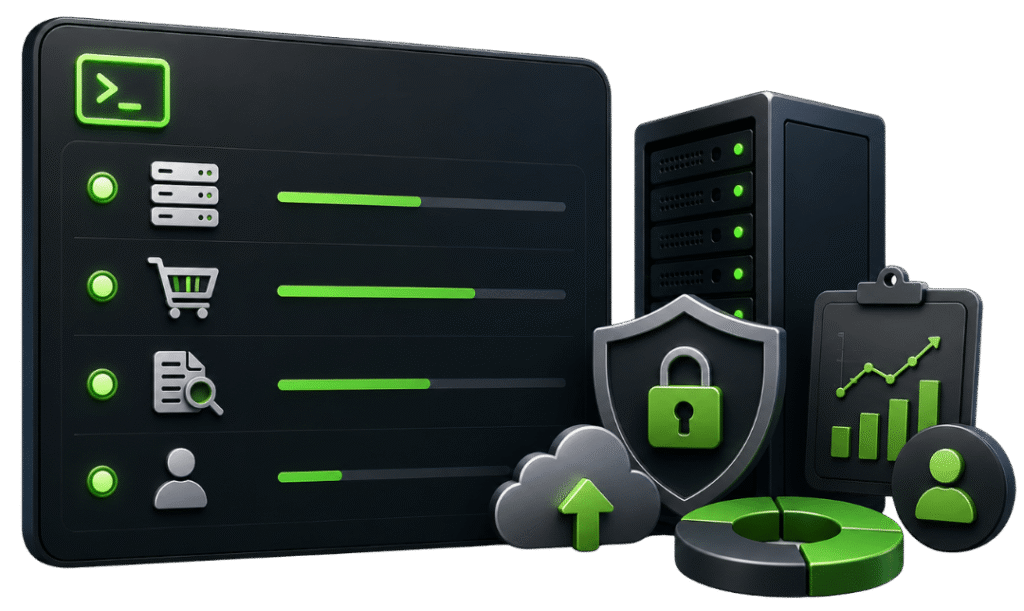
Run a quick status check on most Akaunting instances and the same four flags come up.
Four flags, one fix. Here’s what each one actually means in practice.
Unpatched updates pending
A self-hosted Akaunting instance is only as secure as the last time someone applied an update. On a live accounting system, "we'll get to it" is how a small maintenance backlog turns into a real security gap.
App-store subscriptions active and growing
Most businesses start with one add-on — usually payments or reporting — and quietly add another every few months as needs grow. None of these show up as a single line item, so the total cost is easy to underestimate.
Platform question flagged in diligence
Lenders, investors and even new hires increasingly expect to see a recognised accounting platform. Explaining an open-source, self-hosted setup adds a conversation most finance teams would rather not have mid-negotiation.
Low accountant familiarity
Your accountant can almost certainly work with Akaunting exports, but "can" and "does this daily" are different things. A platform your adviser already lives in tends to mean faster answers and fewer back-and-forth emails at year end.
That’s usually the point Akaunting to Xero migration services stop being optional and start being the obvious next step.
- Migration fit
Is Your Business Ready to Migrate Akaunting to Xero?
The right question isn’t whether Akaunting data can move to Xero cleanly — it usually can. It’s whether your business has actually reached the point where the switch pays for itself in time saved, risk removed, or doors opened.
Good signs
- Akaunting feels smaller than the business now running on it
- Self-hosting has become a maintenance job nobody wants
- An investor, lender or accountant has asked about the platform
- You're already paying for two or three App Store add-ons
- You're hiring finance staff who've never touched Akaunting
Not yet
- A single, low-volume company with no self-hosting concerns
- No near-term need for payroll, payments or advanced reporting
- Comfortable running your own server indefinitely
- Budget is the overriding priority right now
- Nobody outside the business has ever asked about your platform
If most of the right-hand list still applies, Akaunting may remain the right tool — a very small, cost-sensitive business with minimal complexity and no near-term ecosystem needs doesn’t automatically benefit from a bigger platform just because it exists. Discovery is free, and if that’s what we find, we’ll say so rather than push a migration you don’t need yet.
- Akaunting vs Xero
Akaunting vs Xero: Feature Comparison
| Need | Why Xero Fits Better | What to Check Before Switching |
|---|---|---|
|
01
Hosting & maintenance |
Nothing to patch, back up or keep online — Xero is fully managed. | Confirm who currently owns hosting and whether that responsibility genuinely transfers. |
|
02
Accountant network |
A large global pool of certified advisers already fluent in the platform. | Ask your accountant whether they already work in Xero day to day. |
|
03
App ecosystem |
Payments, payroll, inventory and e-commerce apps that plug straight in, instead of a separate add-on for each. | List the specific integrations your business actually uses today. |
|
04
Bank feeds |
Broadly established coverage across major banks, though still worth confirming for yours. | Check live feed coverage for your specific bank and country. |
|
05
Tax & compliance |
Region-specific features such as UK Making Tax Digital are consistently supported. | Confirm the exact compliance requirement for your jurisdiction. |
|
06
User roles |
More granular permissions and a longer-established audit trail as the team grows. | Map your current Akaunting users to the Xero roles you’d need. |
|
07
Cost model |
One subscription instead of a core platform plus a growing stack of paid add-ons. | Add up your real Akaunting App Store spend before comparing plans. |
|
08
Multi-company |
Each business gets its own clean Xero organisation and subscription. | Confirm how many companies need migrating and how complex each one is. |
Feature references checked against Xero UK accounting software information. Final capability depends on plan, region and connected applications.
What's Built In vs What Needs an App
The feature comparison above covers fit. This one covers the practical, day-to-day question: does this come free with the platform, or is it another subscription?
| Capability | In Akaunting | In Xero |
|---|---|---|
| Bank feeds | Available; coverage varies by bank, region and installed app | Broadly established across major banks |
| Payment processing | Usually a separate paid App Store add-on | Native integrations plus a large app marketplace |
| Advanced reporting | An App Store add-on | Built into most plans |
| Payroll | Not a native core module in most regions | Native or tightly integrated, region-dependent |
| Third-party integrations | A comparatively small app store | A marketplace spanning payments, inventory, CRM and e-commerce |
| Accountant & bookkeeper familiarity | A smaller specialist pool | A large global network of certified advisers |
- Migration scope
What's Included in an Akaunting to Xero Data Migration
| Data area | What happens | Key control |
|---|---|---|
▥ Chart of accounts | Retained, consolidated or redesigned for Xero’s structure, then approved before import. | ✓ Account mapping signed off before any data loads. |
●● Contacts | Akaunting’s combined contact records are split into Xero customers and suppliers; duplicates cleaned up first. | ✓ Duplicate and inactive records reviewed before load. |
▦ Companies | Each Akaunting company becomes its own Xero organisation. | ✓ Company-to-organisation mapping agreed in writing. |
▤ Invoices & recurring templates | Migrated for the agreed period; AR ageing reconciled at the conversion date. | ✓ AR ageing total matches the source system at cut-over. |
$ Bills & expenses | Migrated with AP ageing reconciled at the conversion date. | ✓ AP ageing total matches the source system at cut-over. |
▰ Bank & cash | Historical transactions and balances, then an agreed live-feed cut-over. | ✓ Statement and ledger balances checked line by line. |
✎ Manual journals | Converted into supported Xero entries with correct dates and narratives. | ✓ Journal totals compared against the trial balance. |
◇ Items & tax rates | Migrated with tax-code mapping approved in advance. | ✓ Tax-code mapping tested on sample transactions. |
◎ Multicurrency | Transaction currency and exchange-rate treatment preserved where in use. | ✓ Foreign-currency balances checked per currency. |
⌕ Attachments & App Store data | Attachments migrated where possible; App Store functionality matched to a Xero-side or connected-app equivalent. | ✓ App-functionality equivalence documented, not assumed. |
Where Akaunting Migrations Usually Get Complicated
Self-hosted extraction
May need a database-level export alongside Akaunting’s built-in tools and API, depending on version and hosting setup. We confirm which approach applies during discovery, then test it on a small sample before touching live data.
Multi-company consolidation
Each company becomes its own Xero organisation; shared contacts or cross-company transactions are reviewed individually so nothing gets duplicated or double-counted across the newly separated files.
App Store replacement
POS, extra reporting or e-commerce connectors are matched to a Xero-side feature or a connected app before cut-over — the goal is that nobody discovers a missing feature in week two.
- Risk management
How We Protect Your Numbers During the Migration
A matching closing trial balance is the baseline, not the finish line. Everything below gets checked before you see a sign-off request.
Written scope and hosting details agreed
Approved chart of accounts and tax-code mapping
Controlled trial migration for complex setups
Comparative trial balance checked at the conversion date
AR / AP reconciled, including recurring templates
Bank and cash balances validated against statements
Exception log for unsupported App Store functionality
Sign-off from you before go-live
Most problems we see elsewhere come from incomplete self-hosted exports, missed recurring templates, merged multi-company data, or App Store functionality quietly dropped without a replacement. This checklist exists to catch those before go-live, not after.
In practice, reconciliation happens twice: once on a trial migration using representative data, and once on the final cut-over using your actual closing figures. The trial run exists specifically to surface problems while there's still time to fix the mapping — not on the day you're trying to switch off Akaunting for good. Only after both trial balances match, and you've reviewed the exception log, do we call it done.
- Controlled delivery
Our Step-by-Step Akaunting to Xero Migration Process
01
Confirm the shape of the job
Hosting type, companies, users, reporting needs and the go-live target. This is also where we flag anything unusual early — a heavily customised install or an unusual App Store combination — rather than discovering it mid-project.
02
Look under the hood
Akaunting version, hosting environment, installed apps, volumes and export options. We test extraction on a small sample here so the real migration doesn’t start with an unknown.
03
Agree what's in and out
Migration period, inclusions, exclusions, deliverables and control reports, written down and signed off before any transformation work begins.
04
Design the Xero target
Organisations per company, chart of accounts, tax rates and users, mapped against what you actually use today rather than a generic template.
05
Get the data out
Via Akaunting’s tools, API, or direct database access where self-hosted. Extracted data is staged securely, not worked on directly in your live system.
06
Transform it
Convert records into the target model and prepare exception schedules for anything that doesn’t map cleanly — contacts, tax codes, and any App Store-specific data included.
07
Test before it counts
Load representative data, test outputs, and confirm decisions before final conversion. This is the step that catches mapping issues while there’s still time to fix them.
08
Go live
Process the agreed closing data and connect bank feeds, timed to minimise any gap or duplication between the old and new systems.
09
Prove it ties out
Compare trial balances, AR, AP and bank balances; document any variances and their cause rather than leaving them unexplained.
10
Hand it over properly
Train the team, agree an Akaunting archive plan, and stay available through the first few weeks of live use in Xero — most questions come up in that window, not on day one.
- Investment
Akaunting to Xero Migration Cost: What Affects Your Quote
Every quote is scoped and fixed before work starts — no hourly surprises. Three flags decide the number.
Company count
one clean Akaunting company is the fastest, most contained scope.
Hosting type
A self-hosted instance needing database-level export adds a discovery step the cloud version doesn't.
App Store depth
Every add-on in daily use needs a Xero-side or connected-app replacement agreed before cut-over.
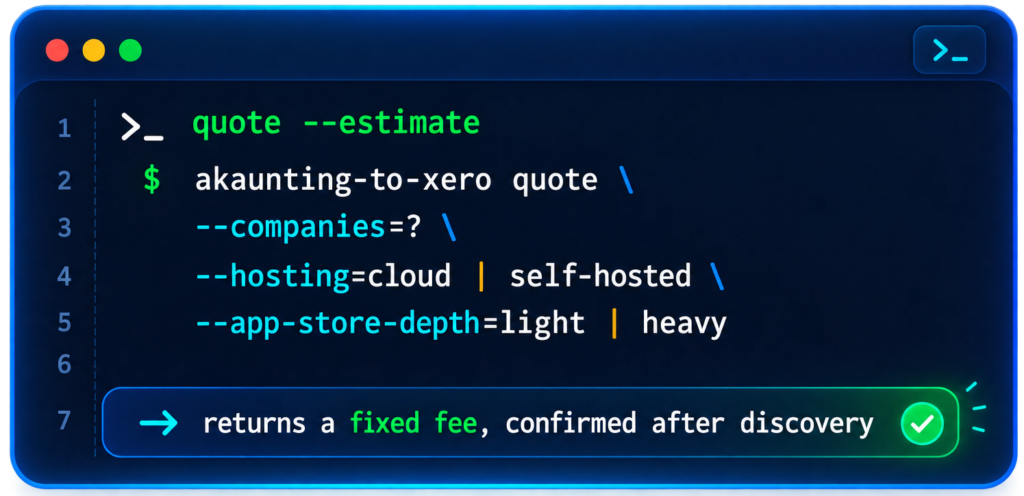
In practice, most quotes land in one of three shapes. A single-company migration with standard invoicing and no self-hosted extraction is usually the fastest, often measured in working days. A multi-company setup, or a self-hosted instance needing database-level export, adds a discovery step and typically runs into a couple of weeks. A migration with several active App Store integrations needing a Xero-side or connected-app replacement takes the longest, since each one is reviewed and matched individually before cut-over.
Tell us where you land on those three and we’ll come back with a fixed number, not a range.
- Evidence & credentials
Evidence Behind Our Xero Migration Expertise
We don’t yet have a published Akaunting-specific case study. Our published Sage 50 migration for Sixpenny Day Nursery follows the same small-business, invoice-and-bill pattern most Akaunting projects involve — full trial-balance tie-out, then a clean handover. Ask us for the latest Akaunting examples at discovery, or browse all client success stories.
eCloud Experts is a Xero Gold Champion Partner with more than 12 years in cloud accounting, including migrations from self-hosted and open-source platforms as well as larger systems like NetSuite, Acumatica and Aqilla. We work directly with business owners and finance teams, whatever the size or shape of the source system.
- Xero-certified advisers and migration specialists
- Direct experience with self-hosted and open-source accounting platforms
- Multi-company mapping and consolidation
- App Store and connected-app replacement planning
- Documented reconciliation and control reporting on every project
- Tailored Xero training and post-go-live support
EXPLORE MORE XERO MIGRATIONS
More Platforms We Migrate to Xero
We migrate businesses to Xero from a wide range of accounting platforms, with careful data mapping, reconciliation and support throughout the move.
⌕















































Akaunting to Xero Migration FAQs
Yes. Whether self-hosted or on Akaunting Cloud, contacts, invoices, bills, transactions and balances can be extracted, cleaned and migrated once a target design and conversion date are agreed.
Yes. Self-hosted instances may need database-level exports alongside built-in tools and the API. Akaunting Cloud typically offers more standardised export options. Either way, the approach is tested before live work begins.
Yes. Each company under one Akaunting login is normally mapped to its own Xero organisation, since Xero separates every business into its own file and subscription.
Features like advanced reporting or payment gateways added via the App Store are reviewed individually for a native Xero equivalent or a suitable connected app.
Bank feed coverage in Akaunting varies by region, bank and installed app. Xero's feeds are broadly established across major banks, though coverage should be confirmed for your specific bank and country.
Recurring templates can usually be recreated in Xero based on the agreed schedule, amounts and contacts, though the exact mechanism differs and is confirmed during discovery.
Usually outgrowing a free or lightweight setup, wanting to remove self-hosting responsibility, a lender or investor asking about the platform, or wanting Xero's wider app ecosystem.
Validation includes comparative trial balances, AR/AP control totals, bank and cash balances, and an exception log for anything that couldn't be represented exactly in Xero.
Depends on company count, transaction volume, hosting type and App Store add-ons in use. Most Akaunting migrations run from a few working days to a few weeks.
Akaunting doesn't include a comprehensive native payroll module in most regions, so payroll is usually already separate. Xero payroll setup can be scoped as its own workstream.
Every quote is scoped and fixed after discovery, based on company count, hosting type, and how many App Store add-ons are in daily use. We don't publish a flat price because those three factors change the number too much for a generic figure to be useful.
A discovery call plus read-only access to Akaunting, confirmation of hosting type, sample exports, App Store add-ons in use, transaction volumes and your target go-live date.
Yes. Training covers everyday processing, bank reconciliation, payables, receivables, reporting and any connected apps chosen to replace Akaunting App Store functionality.
- Plan your migration
Request Your Akaunting to Xero Migration Services Quote
Tell us your hosting type, company count, App Store add-ons in daily use, and target go-live date — we’ll come back with a scoped, fixed number.