Xero Accountant | Xero Migration | Xero Support | Xero Training | Crypto Accounting
+44 0203 488 6202
info@ecloud-experts.com

- Xero Migration Service UK · Certified FreshBooks Conversion Specialists
FreshBooks to Xero Migration Fully Reconciled
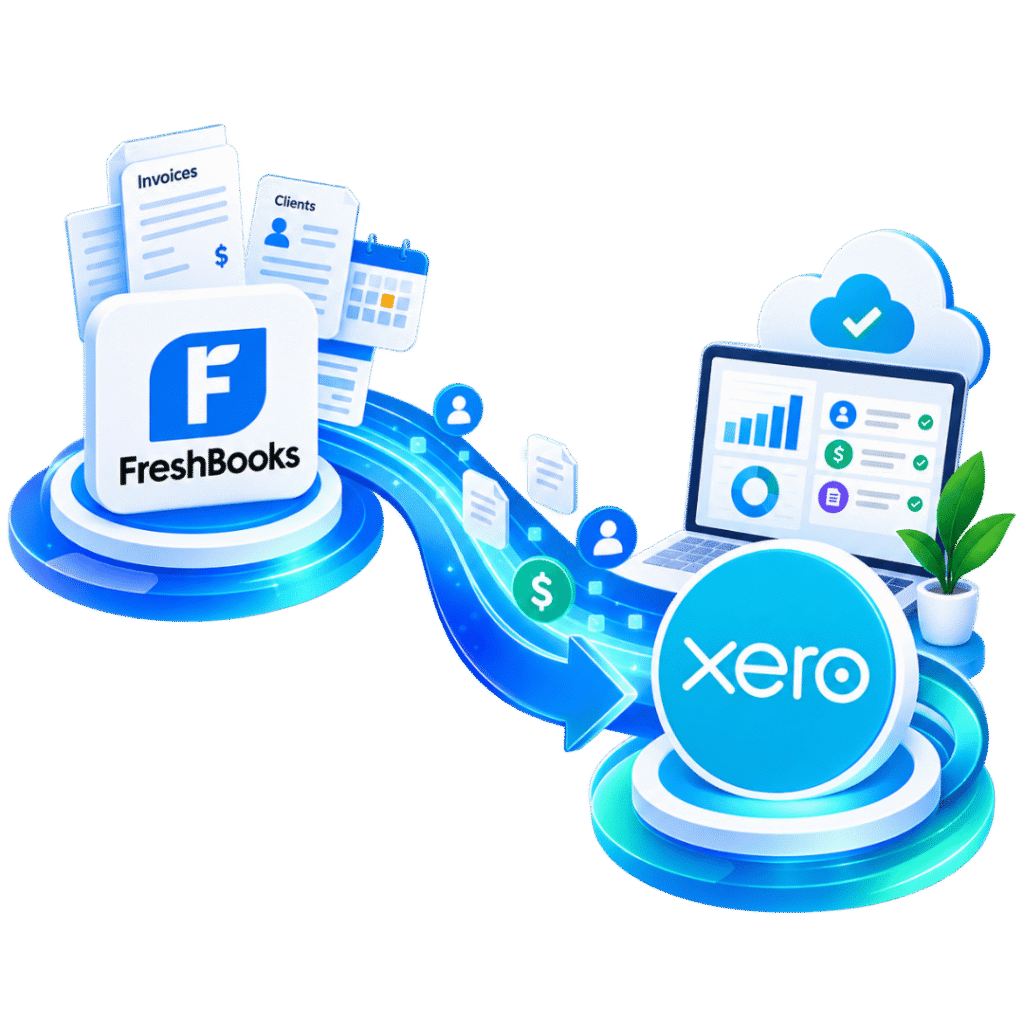
Looking to migrate FreshBooks to Xero without losing a client, invoice or billable hour? Our FreshBooks to Xero migration services carry across your clients, invoices, time entries and retainers, then reconcile every balance against your bank statements and VAT returns before you go live.

Xero Gold Champion Partner

Xero Migration Specialists

AAT Licensed Accountant
Clients We Migrated into Xero




















What our client Says
- Short answer
FreshBooks to Xero Migration
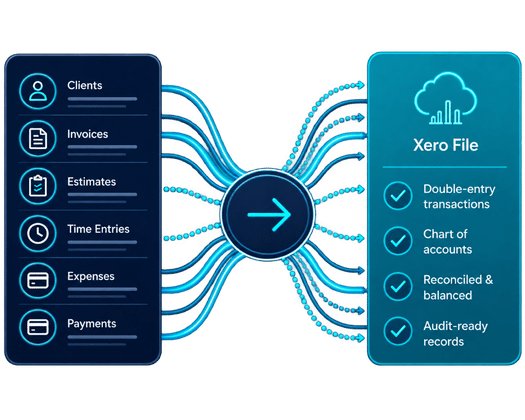
A FreshBooks to Xero migration carries across your client list, invoices, estimates, time entries, expenses and payment history, then rebuilds them as double-entry Xero transactions with a proper chart of accounts. Because FreshBooks doesn’t export directly into Xero’s format, FreshBooks data migration to Xero is an extraction, mapping and reconciliation exercise — every figure goes through FreshBooks to Xero reconciliation against your bank statements and VAT returns before sign-off. Exact scope is agreed on a short discovery call.
What we rebuild
Clients, invoices, time entries, retainers and payment history, as agreed with you.
Complexity we handle
Multiple projects, retainers, part-paid invoices and mixed currencies.
How we check it
Cross-referenced against bank statements, VAT returns and filed accounts.
What you're left with
A configured Xero file, team training and post-go-live support.
- Straight answer
What does a FreshBooks to Xero migration involve?
FreshBooks holds genuinely useful records — invoices, time entries, client history — but it's built around invoicing and time tracking first, and full double-entry bookkeeping second. Xero flips that: a proper general ledger, chart of accounts and audit trail come first. A FreshBooks to Xero conversion is a rebuild, not a straight export.
eCloud Experts agrees your conversion date, chart of accounts and data scope with you before starting. We extract your FreshBooks records — covering FreshBooks client data migration, invoices, time entries, retainers and payments — and rebuild them as proper Xero transactions, then reconcile the result against your bank statements, VAT returns and last filed accounts.
- Conversion note
Not every FreshBooks report has a like-for-like home in Xero
Retainers, project-profitability views and time-tracking reports work differently in Xero. We agree upfront which reports need rebuilding with Xero's tracking categories and project tools, and which are better handled by a connected app.
- Straight answer
What does a FreshBooks to Xero migration involve?
FreshBooks works well for solo freelancers and small service teams focused on invoicing and time tracking. Businesses typically decide to move from FreshBooks to Xero once they need more from their books than FreshBooks was built to give.
01
Strong candidates for conversion
Freelancers and consultants scaling into a small team that needs proper payroll
Agencies juggling multiple retainers, projects and part-paid invoices
Businesses registering for VAT or preparing for Making Tax Digital
Teams that need more than one person in the books, with defined permissions
Businesses wanting deeper reporting, multi-currency or wider app integrations
Companies preparing their first statutory accounts, audit or investment round
02
Cases that need a closer look
Heavy reliance on FreshBooks' project-profitability or time-tracking reports
Multiple retainers with complex part-payment or credit arrangements
Significant historical time-entry data tied to specific invoices
Businesses using FreshBooks' proposals or client portal extensively
Several years of history with inconsistent client or project naming
- Worth knowing
When staying on FreshBooks may still make sense
If you're a solo freelancer with straightforward invoicing and no VAT or payroll complexity, FreshBooks can remain the right fit. We check this on the discovery call before recommending a move.
- Conversion scope
What does FreshBooks data migration to Xero include?
Every FreshBooks to Xero migration is scoped around what your account actually contains — covering FreshBooks invoice migration, FreshBooks client data migration, FreshBooks time entries to Xero, FreshBooks projects to Xero and FreshBooks retainers to Xero, plus FreshBooks historical data migration and FreshBooks multi-currency migration where these are agreed in scope.
| Data Area | How It’s Typically Handled | Key Control |
|---|---|---|
| Client Records | Contact details, billing info and notes rebuilt as Xero contacts | Duplicates and inactive clients reviewed |
| Invoices & Credit Notes | Reconstructed as Xero sales invoices and credit notes | AR ageing reconciled at conversion date |
| Estimates & Proposals | Rebuilt as Xero quotes where required | Open estimates reviewed with you |
| Time Entries & Projects | Mapped to Xero projects or tracking categories | Billable status and rates checked |
| Retainers | Rebuilt as Xero recurring invoices or prepayments | Retainer balances reconciled to source |
| Expenses & Receipts | Reconstructed as Xero bills and spend transactions | Receipts attached where available |
| Payments Received | Matched to invoices and bank transactions | Bank statements cross-checked |
| Mileage | Migrated as a summarised position, or handled by a connected app | Opening mileage log reviewed |
| Chart of Accounts | Built from your FreshBooks categories or a fresh Xero-standard structure | Account mapping approved before import |
| VAT Settings | Tax codes and rates rebuilt to match your obligations in Xero | Return figures checked against filed VAT returns |
- Pick your depth
Full rebuild, comparative history, or opening balances
How deep a FreshBooks to Xero conversion needs to go depends on what your account holds, what you need to report on, and your timeline — not every business needs every invoice rebuilt.
OPTION 01
01
Full transactional
rebuild
Right for teams that need detailed prior-period records inside Xero and want to retire FreshBooks completely at cut-over. It's the most thorough option, and the one that needs the most reconciliation.
OPTION 02
02
Comparative
history
A set number of prior periods is rebuilt to support comparisons and management reporting, without reconstructing your entire invoice archive.
OPTION 03
03
Opening
balances only
Suited to a clean start where FreshBooks stays on hand as a historical record. We set opening receivables and ledger balances at the agreed date.
Once record quality and reporting needs are clear, budget is usually what decides between these.
- Side by side
FreshBooks vs Xero: how they compare
FreshBooks is a strong tool for invoicing and time tracking, and plenty of freelancers run on it happily for years. Here’s where the difference tends to show up once bookkeeping moves onto Xero.
| Feature | FreshBooks | Xero |
|---|---|---|
| Core Strength | Invoicing, time tracking and client management | Full double-entry accounting for growing businesses |
| Bookkeeping Structure | Simplified ledger, limited chart-of-accounts control | Proper double-entry ledger with locked periods |
| Team Access | Limited users on lower-tier plans | Multi-user, role-based permissions as standard |
| Multi-Currency | Limited to certain plans | Native multi-currency across the platform |
| VAT & Making Tax Digital | Basic VAT tracking | Built-in, MTD-compliant VAT submission |
| Reporting | Invoicing and time-based reports | Full financial reporting suite |
| Payroll | Not available natively | Built-in payroll options |
| App Marketplace | A smaller set of integrations | 800+ third-party app integrations |
- Who we help
Types of business we convert into Xero
01
Freelancers & Consultants
02
Software & Web Development Studios
03
Creative & Marketing Agencies
04
Small Professional Services Firms
05
Coaches & Service Providers
06
Multi-Retainer Agencies
07
Multicurrency Businesses
08
Growing Teams Adding Payroll
09
Businesses Preparing for MTD
10
Businesses Raising Investment
- How we run it
Our FreshBooks to Xero conversion process
A staged approach, so scope, mapping and reconciliation are all agreed before anything gets entered into Xero.
01
Discovery and objectives
We confirm your business structure, reporting priorities, integrations and target go-live date.
02
Data assessment
Your FreshBooks account, bank statements, VAT returns and prior accounts are reviewed for quality and gaps.
03
Scope and acceptance criteria
We agree the conversion date, what's in and out of scope, and the control reports we'll use to sign off.
04
Xero target design
Chart of accounts, tax settings, tracking categories and projects are designed around your business.
05
Reconstruction and staging
Clients, invoices, time entries and retainers are rebuilt in controlled working files first.
06
Mapping and migration
Reconstructed records are entered into Xero and any structural differences are resolved.
07
Reconciliation and sign-off
Opening balances, AR and bank position are checked against statements and filed returns, with variances documented.
08
Training and support
We hand over the Xero environment, train your team, and support you through go-live.
01
FreshBooks multi-currency migration
If you bill clients in more than one currency, FreshBooks multi-currency migration involves working out the currency of each invoice, the exchange rate used, and any outstanding foreign-currency balances. Rates can be rebuilt in Xero wherever your records and Xero's import method support the agreed treatment.
02
FreshBooks projects and retainers to Xero
If your FreshBooks account tracks several retainers or client projects, each is assessed and mapped to a Xero project or tracking category as part of moving FreshBooks projects to Xero and FreshBooks retainers to Xero. Part-paid balances and credit arrangements are reviewed individually so nothing is lost in the rebuild.
- Risk management
How FreshBooks to Xero reconciliation protects accounting integrity
Written scope, conversion date and rebuild assumptions
Controlled trial migration for multi-retainer or complex projects
VAT return cross-check for each filed period
Exception log for unclear or incomplete FreshBooks entries
Approved chart of accounts and tracking-category mapping
Bank statement reconciliation at the conversion date
Opening balance sign-off against last filed accounts
Client data handled under written confidentiality and UK GDPR obligations
Common problems we prevent
Things tend to go wrong when a retainer balance doesn’t tie back to what’s actually been invoiced, duplicate clients pile up from repeat imports, VAT is applied inconsistently across older invoices, or time entries get billed twice across overlapping projects. We’re set up to catch these before handover — not after you’ve gone live.
Worth flagging Important
What ends up in the final control pack depends on the records your FreshBooks account and supporting documents can actually provide. Any data-quality issue we can't resolve gets documented clearly — it's never quietly forced into Xero. 65
- The upside
What you get once you're on Xero
Automated bank feeds
01
Transactions import from your bank every business day, cutting manual matching against invoices.
Real-time reporting
02
A live, accurate view of your financial position — not just an invoicing dashboard.
Faster online payments
03
Get paid faster by connecting Stripe, GoCardless and more.
Professional invoicing
04
Recurring, branded invoices with a notification the moment they’re opened.
Multi-user permissions
05
Bring on bookkeepers, accountants or team members with proper role-based access.
800+ app integrations
06
Project management, inventory and expense tools — all connected to Xero.
Built-in payroll
07
Seamless payroll and accounting in one place, once you take on your first employee.
Access anywhere
08
No server or VPN needed — check your books from any device, any time.
- Why eCloud Experts
Accounting-led expertise in FreshBooks to Xero conversions
eCloud Experts is a certified Xero migration partner that specialises in moving service-based businesses off invoicing tools like FreshBooks and onto a properly structured, reconciled Xero ledger.
Our FreshBooks to Xero migration services support freelancers, consultants and agencies on rebuild projects of every size — from a single-user FreshBooks account to multi-retainer operations with several client projects running at once.
Certified Xero migration specialists
Experience rebuilding bookkeeping from FreshBooks, Excel and other systems

Full-history and multi-currency capability

Project and retainer mapping support

Documented reconciliation against bank statements, VAT returns and filed accounts

Tailored Xero training and post-go-live support

UK-led delivery with coverage across Europe
- Client stories
What clients say about working with us
I contacted eCloud Experts because I needed help with crypto accounting and tax matters, and wanted an accountant who actually understood cryptocurrency…

Masum Ahmed
eCloud Experts has been an exceptional partner in managing our accounting needs with Xero. Their deep expertise and hands-on support have made a…
Amolesh Chandra Paul
I contacted eCloud Experts because I needed help with crypto accounting and tax matters, and wanted an accountant who actually understood cryptocurrency…
Masum Ahmed
eCloud Experts has been an exceptional partner in managing our accounting needs with Xero. Their deep expertise and hands-on support have made a…
Amolesh Chandra Paul
EXPLORE MORE XERO MIGRATIONS
More Platforms We Migrate to Xero
We migrate businesses to Xero from a wide range of accounting platforms, with careful data mapping, reconciliation and support throughout the move.
⌕















































- FAQ
FreshBooks to Xero migration FAQs
You migrate FreshBooks to Xero by extracting your client, invoice, time entry and retainer data from FreshBooks, mapping it to a Xero chart of accounts, rebuilding it as proper double-entry transactions, then reconciling the result against your bank statements and VAT returns before going live. eCloud Experts agrees the scope and conversion date with you first.
FreshBooks data migration to Xero typically covers client records, invoices and credit notes, estimates, time entries, projects, retainers, expenses and payments received. The exact data types and date range are agreed with you before any work starts.
Yes. Depending on what's agreed and how your FreshBooks account is set up, FreshBooks historical data migration can include past invoices, credit notes, payments and time entries reconstructed inside Xero. The period covered is agreed before work begins.
FreshBooks time entries to Xero are mapped to Xero projects or tracking categories, with billable status and rates checked against your FreshBooks records. Moving FreshBooks projects to Xero may involve rebuilding profitability views using Xero's native reporting tools, since some FreshBooks reports don't have a like-for-like equivalent.
FreshBooks retainers to Xero are typically rebuilt as Xero recurring invoices or prepayments, depending on how they were structured in FreshBooks. Outstanding retainer balances are reconciled back to your FreshBooks records before sign-off.
Yes, within the limits of your Xero plan and its supported currencies. FreshBooks multi-currency migration involves identifying transaction currencies, exchange rates and any outstanding foreign-currency balances, then reconciling the agreed control totals.
FreshBooks to Xero reconciliation validates the migrated result against your bank statements, VAT returns and last filed accounts, alongside comparative trial balances, AR control totals and an exception log for the agreed conversion dates.
Most projects to move from FreshBooks to Xero run from a few working days to a few weeks, depending on client and invoice volume, how many projects or retainers are involved, currencies, and how much history you need.
Yes. FreshBooks client data migration rebuilds contact details, billing information and notes as Xero contacts, while FreshBooks invoice migration reconstructs invoices and credit notes with AR ageing reconciled at the conversion date.
Open estimates and proposals can usually be rebuilt as Xero quotes where required, and receipts or expense attachments can be linked to the relevant Xero transactions where technically available and agreed in scope.
Yes. Training after your FreshBooks to Xero conversion can cover day-to-day invoicing, bank reconciliation, project and retainer tracking, reporting and month-end routines.
Cost depends on client and invoice volume, the number of projects or retainers, currencies involved, and how much historical data needs rebuilding; most FreshBooks to Xero migration services are quoted as a fixed fee after a discovery call. To quote, we typically need export access or reports from your FreshBooks account, recent bank statements, your last filed accounts or VAT returns, transaction volumes and your target go-live date.
- Plan your conversion
Ready to migrate FreshBooks to Xero?
Tell us a bit about your business, roughly how many clients and invoices you handle, whether retainers or multiple currencies are involved, and when you’d like to go live. We’ll review your FreshBooks account and recommend the right way to move from FreshBooks to Xero.